
SPOILER-FREE BROWSER GUIDE
Best Friends for Dinner! Controls and settings
Set your reading pace, change the game’s language, and get back to the story if it stalls.
01 · READ THE STORY
Move through the dialogue
- Mouse or touch
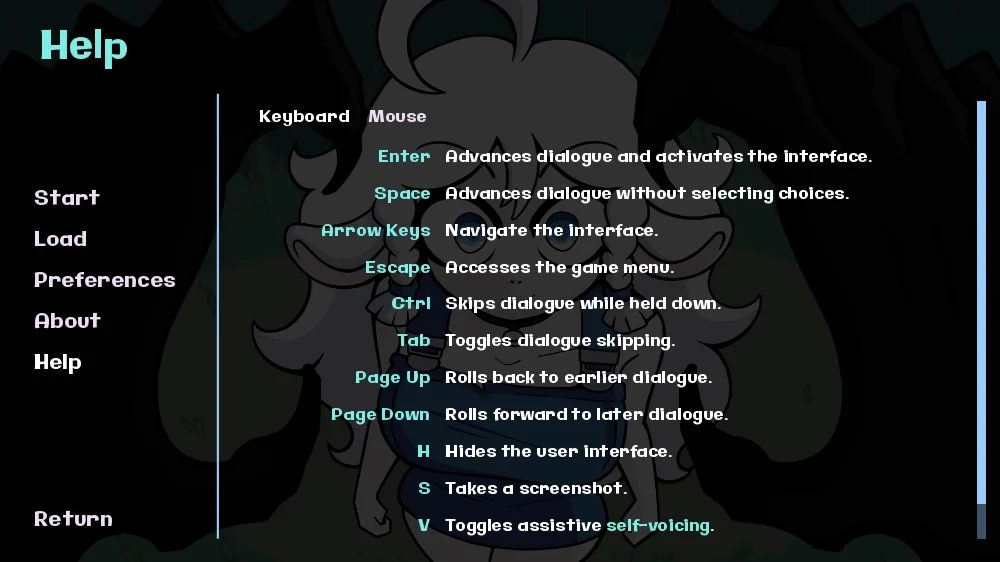
- Click or tap the dialogue box to advance a line. On a phone, rotate the screen if the dialogue feels cramped.
- Keyboard
- Click inside the game first, then use Space to advance. From the title menu, open Help for the full keyboard reference.
02 · MAKE IT COMFORTABLE
Change language, pace, or sound
- Language
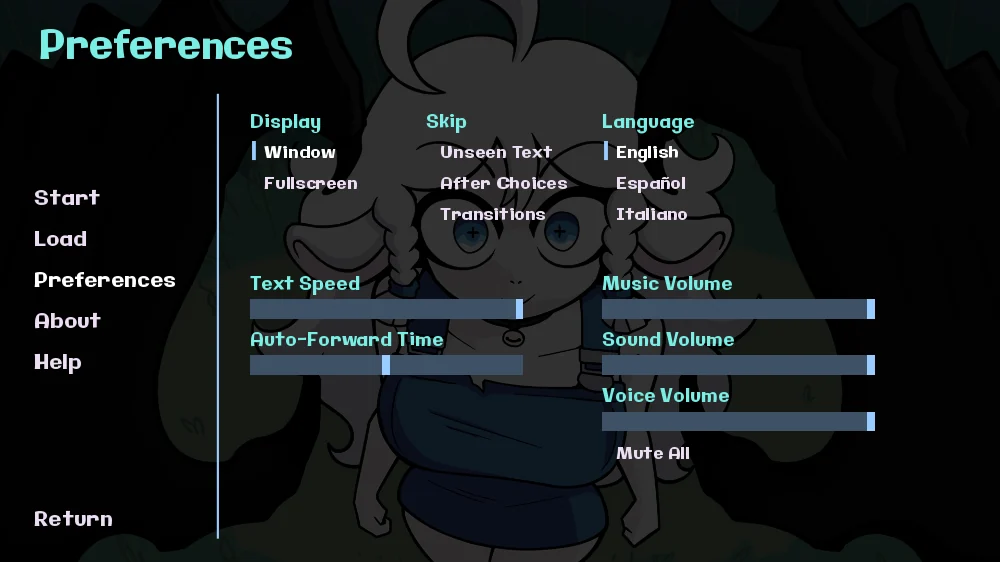
- Choose Preferences from the title menu, then select English, Español, or Italiano under Language. Cómo jugar en español.
- Reading pace
- Text Speed controls how fast the letters appear. Auto-Forward Time adjusts the pause when auto-advance is active. Advance manually to take as long as you like on each line.
- Sound
- Music, sound, and voice have separate sliders. Use Mute All for a quiet read.
03 · GET BACK TO THE STORY
Game not loading or responding?
Look at what’s in the player before you reload. A download screen, the title menu, and a line of dialogue each need a different next step.
If the game is still open in another tab, switch back to that tab to keep your place.
- The download screen is still moving
- Leave the tab open until Donna and the Start menu appear. The first download can take several minutes on a slow connection. Reloading while the game downloads starts the loading process again.
- The player stays blank or shows an error
- Use Open in a new tab next to the player to try the game on its own. If you haven’t started the story, you can also try Reload game once. Reloading may discard unsaved progress.
- The title menu appears but the story hasn’t started
- Choose Start inside the game. On a small screen, turn your phone sideways for a larger view of the menu.
- Dialogue is visible but Space scrolls the page
- Click inside the game window to give it keyboard focus, then press Space. On a touchscreen, tap the dialogue box to move to the next line.
- You want to come back later
- Choose Save under the dialogue and select a slot. Return using the same browser, profile, and player mode you saved in, then choose Load. You can also find Demonward’s desktop downloads on itch.io.
Once the game is running, the story guide points out moments worth a second look. For a desktop copy, find the download for your device.
Back to the browser game